


Messages - SMS + MMS Messenger
4.0199.00 Reviews
App Specs
- Version
- 2.3.39
- Updated On
- License
- Free
- Downloads
- 500,000+
- Developer
- Dovi AI
- Categories
- Communication
- Platform
- Android
Screenshots
 Analysis by AppCompare
I judge a texting app less by how many decorative extras it offers than by what happens when I’m trying to send a message at an inconvenient moment. A picture that needs to reach a relative, a quick reply while I’m carrying groceries, or a group plan that changes at the last minute all put different demands on messaging. Messages - SMS + MMS Messenger is a communication app built around familiar SMS and MMS conversations, with additional ways to make those chats feel more personal. Its appeal is straightforward: it gives everyday texting a more customizable home without asking me to rethink how I contact people.
When sending depends on the connection
Connectivity matters most when a message is more than a few words. A basic text, a photo, a video, and a group conversation do not always behave the same way across mobile networks. In my view, the useful habit is to pay attention to what you are sending and whether the moment is a good one for it. If a picture is important, I would check that it has actually gone through before assuming the recipient has seen it; if a plan is urgent, I would not treat a sent message as confirmation that everyone has read it.
That distinction is especially practical in group chats. A message can be delivered while one person is out of coverage, busy, or simply not looking at their phone. I use a group conversation to share the plan, but for a time-sensitive change I would still contact the person who needs to act. That is not a flaw unique to this app; it is a sensible way to use SMS and MMS, where the experience depends partly on the carrier and the other person’s device.
Made for everyday phone use
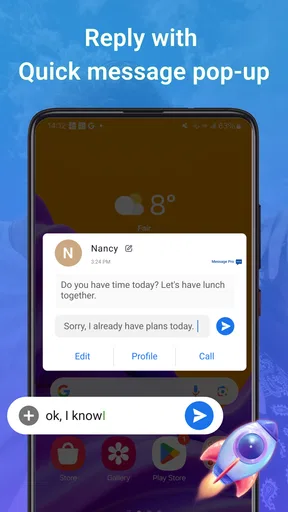
The strongest fit here is someone who already relies on standard texting and wants a more personal interface for it. Themes, group conversations, and notification replies can make routine exchanges feel less fiddly, particularly when I am moving between work, family, and social messages. A useful small workflow is to reply to a simple question from the notification, then open the full conversation later if I need to catch up or send something more involved. That keeps a quick exchange quick without turning every notification into a reason to browse the app.
For an ordinary day, imagine arranging a pickup while walking out of a shop. A short reply from the notification is convenient; sending a photo of a product or a voice message is better saved for a moment when I can check the recipient and the connection. When I return to the conversation, I can see the surrounding messages before answering a detail I might otherwise miss. The app’s value in that situation is not that it removes the need to pay attention, but that it makes common texting tasks easy to reach.
Where it sits beside other messaging choices
Compared with the messaging app already on a phone, this one is most appealing if customization and its collection of expressive extras matter to you. If your priority is the simplest possible interface, or you rarely send anything beyond plain texts, switching may not change much. Compared with internet-first chat services, SMS and MMS are familiar ways to reach people through their phone numbers, but the conversation is still shaped by carrier messaging rather than the broader feature set a dedicated online chat platform may offer. I would choose according to who I need to reach, not assume one app is best for every conversation.
That makes it a reasonable option for someone whose contacts do not all use the same chat service. It is less compelling for a group that expects everyone to use a particular platform for shared media, rich reactions, or a consistent experience across devices. Before moving important conversations, I would test a normal text and a group exchange with the people I contact most. That simple check tells you more about fit than a theme preview does, especially when different recipients use different phones or network providers.
Worth Reading Before You Choose

EA SPORTS FC Mobile 26 Is a Bigger Football Game, but It Takes Time

Flipboard Shows What News Apps Must Do Beyond the Feed

Switching to Android Auto Means Rethinking Your Driving Routine

Google Calendar Makes a Crowded Week Easier to Manage

Ludo King Makes the Most of the Minutes Between Plans

Baby Panda World Brings Quick Play to Modern Phones, but Its Game Library Feels Busy
Useful habits for media and group messages
One non-obvious trade-off with a media-friendly messenger is that sending a picture or video can be less predictable than sending a short text. I would keep a concise text alongside important media when the recipient needs to know why it matters, rather than relying on the image alone. For a group, I also try to make the next action explicit—who is meeting where, and when—so nobody has to infer the plan from a chain of reactions or stickers. These habits reduce confusion without depending on special tools.
Voice messages can be handy when typing is awkward, but they are not always considerate: the recipient may be somewhere they cannot listen. If the detail is important, I would include a brief written summary too. Likewise, stickers and emojis can add warmth to casual chat, but I would keep directions, dates, and other details in plain language. The app gives conversations room for expression; clarity still comes from how I phrase the message.
What to check when a message seems stuck
If something does not appear to send, I would first distinguish a connectivity problem from a misunderstanding about delivery. Check whether the phone has service, whether the conversation is with the intended person, and whether the message was text or media. For a time-sensitive update, sending a short follow-up is often more useful than repeatedly resending a large attachment. If the recipient still has not received it, another contact method may be the better choice for that moment.
After a disruption, I would reopen the conversation and confirm what is visible before continuing as if the exchange were complete. This is a practical recovery habit, not a promise that every message will automatically retry or arrive in a particular way. With group plans, a direct check with the person responsible for the next step can prevent a missed pickup or meeting. The key is to treat the app as a messaging tool, not as proof that a person has read or acted on a message.
Keeping mobile use sensible
For people watching their mobile data, plain texts are a different proposition from photos and videos. I would save larger media for a suitable connection when that is an option, and avoid sending several versions of the same file just because the first takes time. It also helps to ask whether everyone in a group needs the attachment; one relevant image can be more useful than a stream of near-duplicates. These choices make the experience easier to manage without assuming a particular data-saving control is available.
There is a related attention cost. Themes and expressive extras can make a messenger more enjoyable, but they do not need to turn every exchange into a long session. I keep the quick-reply habit for simple answers and open the app deliberately when I need context. If you want messaging to stay lightweight, that division is useful: notifications handle the small stuff, while the conversation view is for decisions that need more care.
Who will appreciate it, and who may prefer something else
I can see this working well for someone who wants familiar phone-number messaging with a more personalized feel, sends occasional media, and likes having group chats and notification replies close at hand. It may also suit households or mixed-age groups that are more comfortable with ordinary texting than asking everyone to join a new service. The app is free to start, while optional in-app purchases are listed from $4.99 to $14.99 per item, so I would look at the purchase details before paying for anything rather than assuming every extra is included.
I would steer a privacy-focused user toward checking the app’s current privacy and encryption details before discussing sensitive matters. The existing article describes end-to-end encryption, but messaging security is important enough that I would not rely on a vague impression: check the app’s own current explanation and consider whether the people you are contacting use the same protected service. Someone who needs a clearly documented, consistent encrypted conversation across all participants may prefer a dedicated secure messenger. Similarly, if your friends already coordinate on a single internet-based platform, moving them to another app could create more friction than it solves.
How it feels as a product to choose
The app is developed by Dovi AI, and its store rating averages 4.0 from around 1.8 thousand ratings, alongside roughly 199 written reviews. It has passed 500 thousand installs, is free to download, and is rated for Everyone. Those figures suggest it has found an audience, but I would treat them as context rather than proof that it fits my own phone, contacts, and habits. Its current version is 2.3.39, and it supports Android 7.0 and later, which gives older compatible devices a route to try it without requiring a recent Android release.
A practical first-day test is to set it up, make sure the people you message most are easy to find, and send a plain text before relying on it for a group plan or an important attachment. Then try the kinds of messages you actually use—perhaps a photo, a group exchange, or a quick notification reply. That short trial helps answer the questions that matter: whether the interface suits you, whether your usual contacts can receive your messages as expected, and whether the extras are worth keeping in your routine.
Getting Started with Messages
First things first, downloading and setting up Messages - SMS + MMS Messenger is a breeze. Available for both Android and iOS, you can snag it from the Google Play Store or Apple’s App Store in a snap. Once installed, the app seamlessly integrates with your existing contacts, so you don’t have to worry about manually importing anything. Pretty neat, right?
Interface and Usability
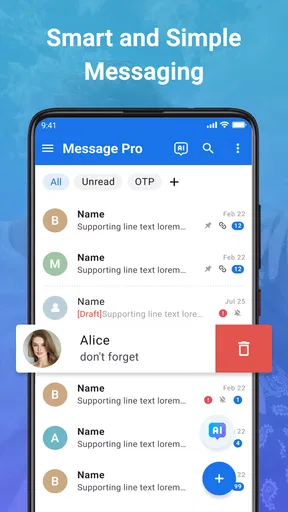
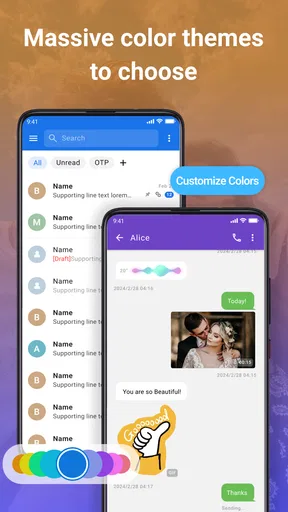
The interface is where Messages - SMS + MMS Messenger truly shines. It sports a clean, intuitive design that doesn’t overwhelm you with unnecessary clutter. The conversations are organized neatly, allowing you to navigate through your chats without a hitch. One of my favorite features is the customizable themes. Whether you’re into dark mode or vibrant colors, there’s something to suit your style. And let’s be honest, who doesn’t love a little personalization?
Another handy feature is the quick reply option. If you’re like me, always on the go, being able to swipe and reply from the notification bar is a game changer. No more fumbling around to open the app every time a text comes through!
Features that Stand Out
What sets this app apart from the standard SMS apps are its rich features. Aside from the usual SMS and MMS capabilities, it supports group chats, so you can keep the entire gang in the loop. Plus, sending pictures, videos, and even voice messages is a cinch.
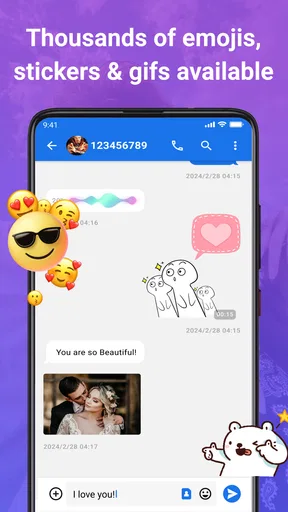
For those who love to express themselves through emojis and stickers, you’re in luck. The app comes loaded with a ton of options to spice up your conversations. I found myself using these way more often than I’d like to admit!
Privacy and Security
In today’s digital age, security is a top priority, and Messages - SMS + MMS Messenger takes it seriously. The app offers end-to-end encryption, ensuring that your messages remain private and secure. It’s reassuring to know that your chats are safe from prying eyes.
Performance and Reliability
Performance-wise, the app is smooth and responsive. I didn’t encounter any lag or crashes during my time using it. The developers seem to have done a stellar job optimizing it for different devices. Battery consumption is minimal too, so you won’t find it draining your phone’s juice.
Final Thoughts
All in all, Messages - SMS + MMS Messenger is a fantastic choice for anyone looking to streamline their messaging experience. It’s user-friendly, packed with features, and provides the kind of privacy we all need in a messaging app. If you’re tired of juggling multiple apps and want something that just works, give this one a shot. You might just find it’s the messaging app you didn’t know you needed.
Pros
- User-friendly interface for easy navigation.
- Supports multimedia messages seamlessly.
- Offers customizable themes and colors.
- Strong privacy settings for users.
- Efficient group messaging capabilities.
Cons
- Lacks advanced search functionality.
- Limited integration with other apps.
- Occasional delays in message delivery.
- Ads can be intrusive at times.
- No cloud backup for message history.
FAQs for Messages - SMS + MMS Messenger
What features does Messages - SMS + MMS Messenger offer?
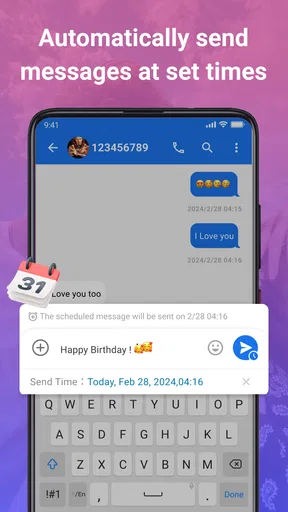
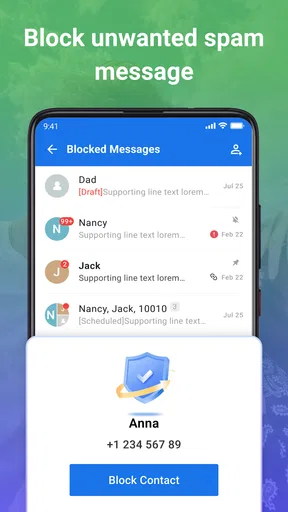
Messages - SMS + MMS Messenger provides a comprehensive messaging experience with features like group messaging, multimedia sharing (photos, videos, and audio), customizable themes, and emoji support. Additionally, it offers quick replies, message scheduling, and advanced search capabilities to enhance user convenience. The app is designed to provide a seamless communication experience on both Android and iOS platforms.
Is Messages - SMS + MMS Messenger secure to use?
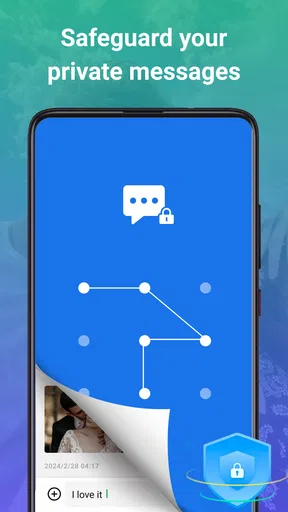
Yes, Messages - SMS + MMS Messenger prioritizes user security by offering end-to-end encryption for your messages, ensuring that your private conversations remain confidential. The app also allows you to set passcodes or use biometric authentication for added security, keeping your messages safe from unauthorized access.
How does Messages - SMS + MMS Messenger handle multimedia files?
The app makes it easy to send and receive multimedia files, including images, videos, and audio messages. It supports high-resolution image sharing and compresses video files to ensure quick delivery without compromising quality. The app also organizes multimedia files within conversations, making it easy to access and manage your media content.
Can I customize the appearance of Messages - SMS + MMS Messenger?
Absolutely! The app offers a variety of customization options to personalize your messaging experience. You can choose from different themes, change text sizes, and select custom notification sounds. The app also allows you to assign unique colors and tones to specific contacts or groups, making it easier to identify incoming messages.
Does Messages - SMS + MMS Messenger support message syncing across devices?
Messages - SMS + MMS Messenger supports syncing across multiple devices, ensuring that your messages are always up-to-date. Whether you're using a smartphone or tablet, the app keeps your conversations synchronized. This feature is especially useful for users who switch between devices frequently, providing a seamless messaging experience.


